Develop
Script the loop. Or test Hyprland itself.
For people who script omabox, in a hook, a test suite or CI, and for people building Hyprland, a shell or a plugin for one. Every command here is one an agent runs on its own too.
Look
Does it look right? One call says.
omabox look checks an app, a shell plugin, a theme or a web page: a shot, what it shows as
text, and the problems it logged. Exit 0 when it found none, 1 when it did, so it fits a script, a hook or a
pre-commit check.
look app
A program
Its window shot, keys sent first if you give them, and its output read for errors, crashes and QML lines.
$ omabox look app --keys "ctrl+comma" -- ./build/applook plugin
A shell plugin
The bar's strip, its panel with --open, whether it loaded, the text the widget shows, and the shell's
warnings that name it.
$ omabox look plugin ~/code/myplugin --openlook theme
A theme
Applied for real: the desktop and a terminal printing its palette, and what a person would notice: text too faint, a colour no fallback resolves, a wallpaper too small.
$ omabox look theme ~/code/my-themelook page
A web page or a game
Chromium in the box with real frames, keys held over many of them, a contact sheet of shots, and the console's uncaught errors.
$ omabox look page game.html --hold Right 1500ms --shots 6Which box
Yours when it's up, a throwaway when not
With a box up, a look goes into it and leaves it as it is, so the same line after every rebuild is the check, in a
second or two: look app replaces the copy it started last time, look plugin restarts the
shell. With no box up, or with --fresh, it starts a throwaway box and takes it down however it ends.
Bare look
The box now, and what broke since
omabox look with no kind reports a box as it is: a shot, its windows, the active one's text, its
plugins, and only the problems logged since the last look.
$ omabox look
screenshot: /tmp/omabox-mybox-101500-123.png
windows: 2
  tally "Tally" 960x680 (floating, active)
  foot "build" 946x1056 (tiled)
text: Today | 42 cups | Reset
plugins: me.tally loaded
box: mybox
new problems:
  tally: qrc:/Main.qml:42: TypeError: Cannot read property 'name' of undefined
The example from omabox's own skill.
Visual checks
Visual checks, without looking at every screen.
Write a scenario: a script that drives the box and calls omabox check point ID where a shot
should match. check run --approve runs it three times in a clean box and keeps what most runs agree on.
From then on, check run says same or changed for each checkpoint. Each changed region is marked, and for an
app with an accessibility tree it names the element (moved +0,+6 button "Save"). One report image shows
every change, the baseline beside the new shot.
# visual.sh, the scenario
omabox run -d --wait -- ./build/app
omabox check point main
omabox click --window app 640 360
omabox check point settings
$ omabox check run --approve -- ./visual.sh   # the baseline, from three runs
$ omabox check run -- ./visual.sh             # same or changed, each checkpoint
$ omabox check run --json -- ./visual.sh      # for CI
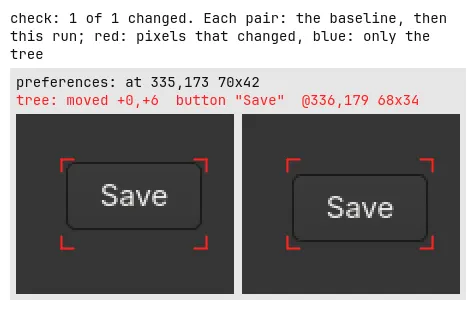
- Small changes caught. A 2 px spacing change is caught, and so is a colour a few levels off.
- Noise left out, and said. What the approve runs disagreed on is left out and said.
- Holes fail. The wallpaper showing through a window fails a check.
- For CI.
--json, and exit 4 when there is no baseline.
Accessibility trees
Text instead of a shot.
omabox tree reads a window's accessibility tree: each control's role, name, text, value and state, with
bounds a click takes. tree --find 'dark mode' prints the one line that answers the question. For GTK and
Qt apps, Chromium or Electron with accessibility on, and egui apps on eframe 0.37+.
$ omabox tree --window app
$ omabox tree --window app --find 'dark mode'
tokens, to read whether dark mode is on
tokens, the one line that says
A bar's text
What a widget shows, without OCR
Omarchy's bar sets no accessibility roles, so tree --layer lists the text the shell draws instead,
with where it is. --find finds what a widget shows, and click --find clicks it. Panels the
same, on their own layers.
$ omabox tree --layer omarchy-bar --find cups
$ omabox click --layer omarchy-bar --find cups
Notifications
What the app notified
Every box records what reaches its notification server: app, summary, body, hints, actions, and each close or
action, whatever server it is. wait notification waits for one; no dbus-monitor to grep.
$ omabox wait notification 'Download finished'
$ omabox log notifications --json
omabox calibrate tells an agent whether its model needs --fit to click right, for
any model and harness.
Snapshot and diff
What it wrote, and what it left behind.
Snapshot the box HOME, install a plugin or an app, use it, remove it, and diff lists what
was added, changed or removed, grouped by area: autostart, systemd user units, mimeapps.list, desktop
entries, the shell's settings, ~/.config, ~/.local/share, elsewhere in HOME. A new folder is
one line.
$ omabox snapshot before
$ omabox plugin add ~/code/tally
  ... use it ...
$ omabox plugin remove me.tally
$ omabox diff before          # what remove left
- What a box writes on its own (
~/.cache, the shell's state, the session's keyring) is left out, so an idle box diffs to nothing.--ignore PATHadds to it;--allshows everything. diff --seedstarts from whatupseeded, before the box started.--jsonfor a script. Links are never followed, FIFOs never opened.- A snapshot lives in the box's folder, not its HOME, and goes with the box.
$ omabox diff --seed --jsonLogs
Who did what, and how it ended.
log commands
Every command against a box
Each omabox command that named the box, a line each once it ended: what it was, whether it only read, its exit
and time, and the agent session that ran it. When several agents share a box, it says who clicked what. Read it
after down too. The text an agent typed, a password and an option's values are never in it, only their
lengths or names.
$ omabox log commands
$ omabox log commands --json --grep click
log run
One job's output
A run -d job's log by its pid, as jobs lists it, ended or not; none named, the latest.
wait log waits for a line in it.
$ omabox jobs
$ omabox log run 12345 --grep error -i
$ omabox wait log 12345 'listening on'
log autostart
What your desk's config started, and what it didn't
In a box of your own desktop (up --desktop desk), what your config starts goes through a policy: idle
and lock daemons, your systemd session and system-bus applets are dropped, the rest runs. Each decision is a line.
Your own desk →
$ omabox log autostartVideo and sound
Videos people can follow.
omabox record films a box, one monitor or all of them at once. --show-input draws in the
clicks and keys, --captions puts your marks on screen, --cut-idle cuts the still stretches,
and --glide makes the pointer travel instead of jump. record stop --sheet makes a contact
sheet, so an agent can check a take without watching it. With up --audio, the sound goes in the video.
It plays to a speaker nobody hears, never yours.
$ omabox up --audio
$ omabox record start -o take.mp4 --monitor all --audio --glide 300ms
$ omabox record mark "Open the settings"
$ omabox record stop --sheet --show-input --captions --cut-idle
omabox audio 3s says whether the box made a sound in three seconds, when and how loud: a notification
sound checked without hearing it.
$ omabox audio 3sMonitors
Every desk you don't have.
A box can have as many monitors as a test needs, each with its own size, scale and place, and a bar on each: a portrait screen beside an ultrawide, mixed scales, a laptop with a monitor plugged in. Add and unplug them while the box runs, and see what your app does.
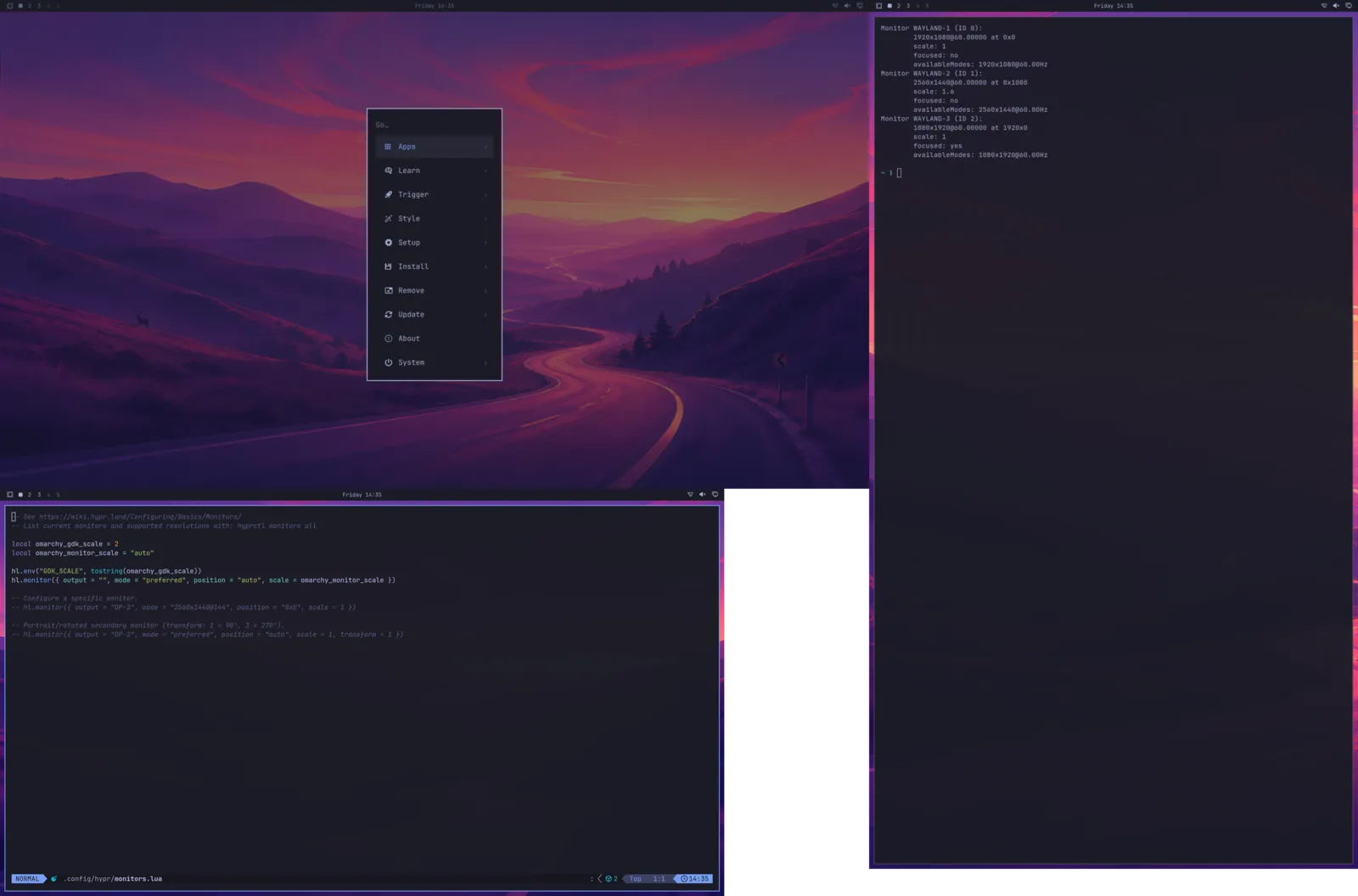
omabox shot.Monitors
Any size, scale and place
Each monitor goes right of or below the one before, or at the place you give it. remove is an
unplug: its workspaces move to the others. shot takes the whole layout or one monitor,
peek --monitor watches one, and clicks and waits work across all of them.
$ omabox up --monitor 1080x1920 --monitor 2560x1440,scale=1.6,below
$ omabox monitor add 1366x768
$ omabox monitor remove HEADLESS-3   # an unplug
$ omabox shot --monitor HEADLESS-4
When a monitor drops off
Find the crash before your users do
A monitor that sleeps, a KVM switch, a dock: output drop takes a screen away and brings it back under
its own name, and your shell and apps rebuild what they drew there. --cycles repeats it until
something crashes; it found a real crash in a shell plugin. omabox ls shows a shell that crashed, and
gdb prints the backtrace of a Hyprland or shell that hung.
$ omabox output drop --for 300ms --cycles 20
$ omabox gdb --shell
A box the agent drives is headless: every monitor at full size. In a box you drive
(up --interactive), each monitor is a window on your desktop, the whole layout scaled down to fit, so its
text is small. Your pointer and cursor go from one window to the next with omabox's own build of aquamarine
(omabox setup --aquamarine).
Apps
Rebuild, restart, look.
Apps
A new build, looked at, in one line
Rebuild, then the same look app line: it stops the copy it started before, launches the new build,
waits until it has drawn, shoots its window and reads its output, Qt warnings and QML errors included. Exit 1 when
something logged an error. To keep driving it yourself, run -d --replace does the restart alone.
$ make -C build && omabox look app -- ./build/app
$ omabox run -d --replace --wait -- ./build/app
$ omabox log run
Saves
Sign in once, every box starts signed in
An app that needs an account, a PIN or a library: set it up in a box once and save its HOME, keyring included. New boxes start from the save. Close the app first for a clean save.
$ omabox save signed-in
$ omabox up --from signed-in
$ omabox run --from signed-in -- ctest --test-dir build
What you tested
The box says what it ran
omabox ls --json records each box's Omarchy version, its theme, and each mounted plugin's git commit,
with +dirty when there were uncommitted changes. A screenshot in a pull request can say exactly what it
shows.
$ omabox ls --jsonServices and alarms
A systemd user manager, if it needs one
For apps that manage a service or schedule alarms: --systemd gives the box a real systemd user manager.
Without it, a box has none.
$ omabox up --systemdAnd
keys down:KEY/up:KEYhold a key across commands, for a bind on release.omabox log journal: a box has its own journal sockets, so programs that log only there work.omabox cpu --threads: a Qt Quick app's main thread apart from its render thread.- Your fonts are in every box, so shots don't fall back silently.
Hyprland
Hyprland and compositor work.
A Hyprland change
Your build, never installed
The box runs your Hyprland build instead of the installed one. Start a stock box beside it to compare.
ls and windows name the build, so a box on it is never taken for a stock one.
$ omabox up patched --hyprland ~/code/Hyprland/build/Hyprland
$ omabox up stock
Given a folder, it runs another version whole: an unpacked package, an install prefix or a build folder, its
libraries (its aquamarine too) and its hyprctl the box's. So a box runs Hyprland 0.57 on a desktop that
still has 0.56. OMABOX_HYPRLAND=DIR makes it every up's default, for a whole suite on
another Hyprland.
$ omabox up next --hyprland ~/pkgs/hyprland-0.57.1Inside it
Lua, events and a backtrace
lua runs Lua in the box's Hyprland and prints what it returns, and sets an option with
hl.config (hyprctl keyword sets nothing in a box). events marks a point and
reads what Hyprland reported after it. gdb prints every thread's backtrace of a Hyprland that hung.
$ omabox lua 'hl.get_active_window()'
$ omabox lua 'hl.config({ general = { gaps_out = 40 } })'
$ omabox events --mark m1
$ omabox events --since m1 --until 'openwindow>>' --timeout 5s
$ omabox gdb
Not on Omarchy? Plain boxes run Hyprland with a small config of omabox's, on Arch, Fedora, Debian and openSUSE, and on Omarchy for a plugin that must not depend on it. Plain Hyprland →
The contract
What your scripts can rely on.
omabox is mostly used by agents, which read its warnings; a script or CI reads exit codes and
--json. From 1.0, within 1.x:
KeptOr only added to
Exit codes, and every --json field: its name, type and meaning. New fields may come, so read the ones you need by name.
| 0 | done, or the condition held |
| 1 | it ran and failed, or the answer is no (look: problems found) |
| 2 | called wrongly |
| 3, 4 | check run: the scenario failed / no baseline |
| 124 | not in time |
| 125 | run: omabox's own failure, never the command's |
WarnedChanged only after a warning
Commands, options, config keys and OMABOX_* variables. The old form works for one more minor release,
with omabox: deprecated: on stderr naming the new one. OMABOX_STRICT=1 refuses it at once, for CI.
$ OMABOX_STRICT=1 omabox check run -- ./scenario.shCarriedSaves and baselines
A save made by a 1.x starts with any later 1.x. A check baseline approved by a 1.x compares with any later 1.x, or is refused (“approve again”), never compared wrongly.
Not coveredWhat can still move
Message wording, help text, defaults, and what Hyprland and other programs report through omabox.
$ omabox help exit-codesEvery code, what it means, in every command.Limits
What a box can't test.
A box runs the compositor's logic for real: layouts, focus, input routing, the Lua config, IPC and protocols. Test these on a real machine:
- Real monitors: their modes, HDR and VRR, a real hotplug. A box's monitors are virtual.
- Several GPUs at once, real input devices, real sound devices, the system bus and suspend.
- The lock screen runs, but takes no real password.
- wgpu apps (eframe's default renderer, iced, Bevy) don't start in a box on NVIDIA: use a GL renderer, or a box on the AMD or Intel GPU.
- A box turns PipeWire's realtime module off for its clients.
- Desktop integration outside a session (.desktop files, URL handlers, autostart), and systemd user units outside
a
--systemdbox.
A box is not a security boundary: for code you don't trust, use ai-jail.
Give every agent a desktop of its own.
git clone https://github.com/diogochaves/omabox && cd omabox && ./install.shAny Hyprland 0.56+ · fullest on Omarchy · AMD, Intel or NVIDIA · MIT