How it works
A whole desktop for every agent, none of it on yours.
A box is a real Hyprland desktop: its own compositor, its own session bus, on a screen only it can see. On Omarchy it is Omarchy's, with your theme and bar. Here is how an agent uses one, and what it keeps off your desktop.
The agent starts a box, works in it, and the box goes when the agent does.
It reaches for a box
Whenever a task touches the desktop: a GUI app, a screenshot, a bar plugin, tests that need a tray or a keyring.
It starts one
A whole desktop only it can see, on one screen or as many monitors as the test needs. Up in a few seconds.
$ omabox upIt looks, fixes, and looks again
look shows its window and what went wrong, tree reads it as text, wait and check hold it to what should be there. Then it fixes, and looks again. Your cursor and focus are never touched.
$ omabox look app -- ./build/app
$ omabox tree --find Save
It goes with the agent
When the agent's session exits, its box goes too, notifications and tray icons included.
Every command and option: /commands. look, tree, check and the rest in depth, and several monitors in one box: /develop.
What a box is
A real Hyprland, not a mock: its own compositor on a private screen, its own session bus. It comes in three kinds; omabox picks the first that fits, and you can ask for any.
Omarchy's desktop
Omarchy's own config and shell, with your theme, bar layout and terminal settings. On Omarchy.
$ omabox upA plain one
Hyprland with a small config of omabox's, and your shell as its bar if you want one. On any distro with Hyprland.
$ omabox up --desktop plainA copy of yours
Your Hyprland config, your shell and your wallpaper, copied into a box. Your session never knows.
$ omabox up --desktop deskWhere each runs, and what each has: /desktops.
What it keeps off your desktop, and how
Everything an agent does to see and test its work happens in its box.
Its own screen
A box runs its own compositor on a private screen. Nothing it opens is drawn on yours.
Its own pointer and keyboard
Clicks and keys go to the box's own virtual devices, never through uinput, so your cursor and keyboard are never touched.
Nothing opens on your session
No focus changes, no workspace switches. When you peek, the window opens on workspace 9 without taking focus.
No system bus, a throwaway keyring
In a box, pkexec fails at once instead of asking for your password. Its keyring stores and reads secrets without prompting; yours is never asked.
Its own bar
Notifications and tray icons land in the box's bar, and go when the box goes.
The guard, if you want it
With omabox guard on, agents' shells get a display that doesn't exist, so a stray window fails instead of appearing. What it stops, and what it doesn't.
What a box gets
Enough of your setup to look and behave like your desktop, and nothing that would let it reach yours.
In the box
- The repo you started it from, read-only, at the same path (from a git worktree too, so git works there)
- On Omarchy, your theme, bar layout and terminal settings
- Your fonts, read-only, so a theme's or a plugin's faces draw as on your desktop
- mise's toolchains, so node, python and uv work as on the host
- Its own screen, session bus and throwaway keyring
Off until you ask
- Network isolation:
--net isolated --allow 8081 - Sound:
--audio, its own PipeWire, a speaker nobody hears and a silent microphone - Addresses of its own for an isolated box:
--addr, documentation ranges only - A systemd user manager:
--systemd - X11 apps:
--xwayland - Your host's network itself, for a tool that scans your LAN:
--net host, only by name - Your real desktop, one command at a time:
omabox host
Never in a box
- Your agents' and browsers' own stores (
~/.claude,~/.codex, browser profiles,~/.pki), whichever way you try to mount them - Plugin settings that look like a key, token or password
api-keys.env, your hooks, or anything of~/.config/omarchybut its plugins and themes- Your keyrings,
~/.ssh,~/.gnupgand the rest of your secret stores
A box keeps an agent's apps off your desktop and out of your config, and never gets your secrets or input devices. It is not a security boundary: it shares your kernel, GPU and, by default, your network (keep ports from it). What it can touch, the rules behind it, and how to fence the agent in with ai-jail: /safety.
Agents use it on their own
Install once. Your agents reach for a box whenever a task touches the desktop, without you asking and without changing your projects.
A skill they already load
omabox setup (install.sh runs it) puts the omabox skill wherever Omarchy puts its own. Agents load it for GUI apps, screenshots, shell plugins and tests that touch the desktop. Since 1.5 its core is 3.6 KB and opens with the four looks (look app, plugin, theme, page); the rest is in reference pages the agent reads by task.
Subagents get a brief
omabox brief -b NAME prints what a subagent needs: the box, its windows, each with a word that finds it, and the rules. It costs a quarter of the skill or less.
$ omabox brief -b app-menu-3b7a6c11It says what changed
After a click or keys with --wait, omabox says what changed: a window opened and took focus, a menu opened, or nothing did. The agent doesn't need a shot to learn that nothing happened.
$ omabox click 600 300 --waitSmall shots, so the context lasts
Screenshots are most of what a session spends. shot --changed sends only what changed since the last one: a menu opening is about 65 image tokens instead of 1.5k, 6.7 times less over 17 measured actions, and nothing at all when nothing changed. pixel reads a colour as text.
$ omabox shot --changed --window myapp
$ omabox pixel 40 12   # the colour there, as #rrggbb
A server that died is said
A run -d job that dies in its first 30 s is one warning on the box's next command, with its exit status and log.
$ omabox run -d -- npm run devSign in once, every box starts signed in
An app that needs an account, a PIN or a library: set it up in a box once and omabox save it. Boxes started --from the save open with it already set up, keyring included.
$ omabox save signed-in
$ omabox up --from signed-in
It says who did what
When several agents share a box, its command log says who clicked, typed or reloaded what: every omabox command run against it, by which session, jailed or not, and how it ended, after down too. Typed text and passwords are never in it. New in 1.5.
$ omabox log commandsOpt-in
Report what omabox got wrong
omabox setup --feedback-skill adds /omabox-feedback. Your agent looks back through the session for omabox failures, takes your paths, names and tokens out, and files them on your yes.
$ omabox setup --feedback-skillOne box per agent session
A worktree keeps agents' code apart. A box keeps their screens, session buses and test runs apart. Each
session's box is named after its repo or worktree and the session, like app-tray-5cc72cdc.
Separate screens
Each box runs its own Hyprland on a private screen of any size. One agent's window never covers another's screenshot.
Separate session buses
Tray icons, notifications, D-Bus names and the keyring are per box, so one agent's test never sees another's, or yours.
Separate lifetimes
One agent's omabox down never ends another's box. A throwaway omabox run -- ctest gets a box of its own, too.
One thing they share: their servers reach you on your 127.0.0.1, one box per port. A server
on a port you or another box already use fails to start (address in use), and omabox ports says who has it. With
--net isolated a box keeps its ports to itself.
Each box: up in 3 to 6 s and about 500 to 600 MB for an Omarchy box, 1 to 3 s and under 250 MB for a plain one (it depends on the GPU), down when its agent exits or after 2 h idle.
Look inside any box, or take the wheel.
A box is invisible until you want to see it.
Ask for one
The easiest way in is to ask.
“Start a box with the app and the dev server running, I want to try it”
That gets you an interactive box: a window on workspace 9 that you drive, opened without taking your focus. Your agent can still click, type and take shots in it, and rebuild the app in place (run -d --replace) while you test. It starts one only when you ask.
Peek
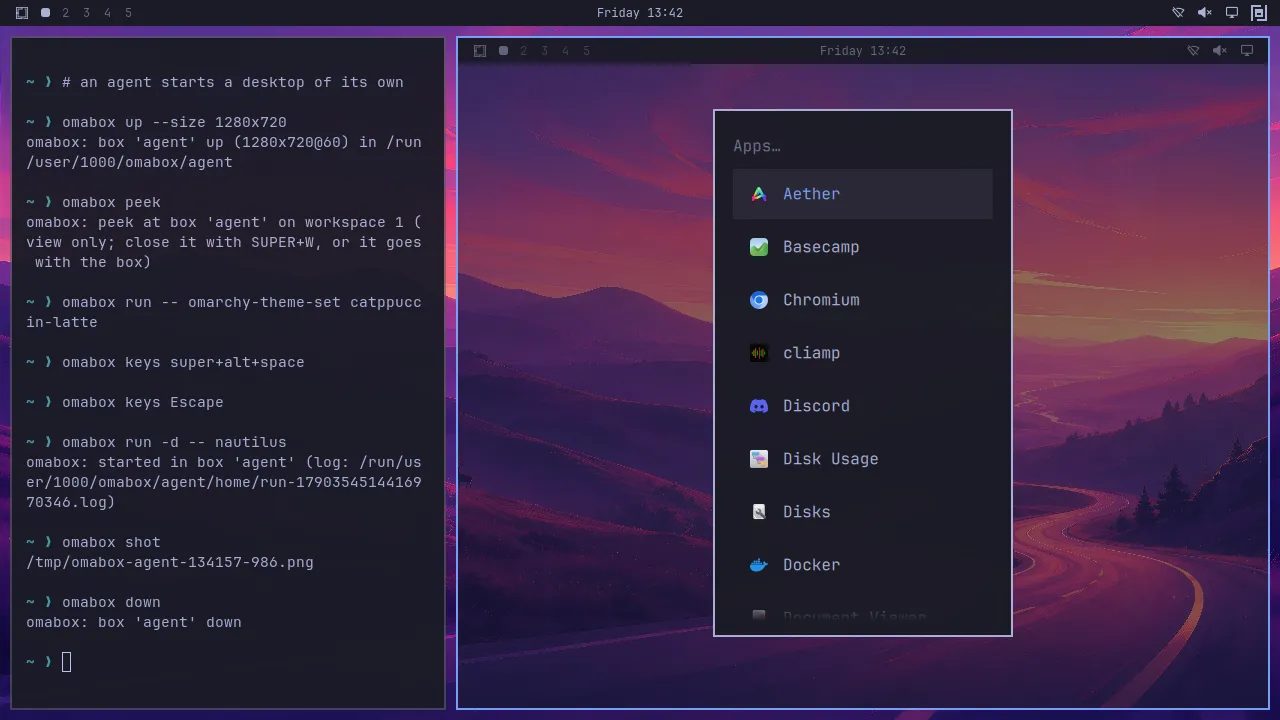
omabox peek opens a live, view-only window of any box on workspace 9, without taking your focus. It only copies frames out, so the agent never notices.
Interactive
omabox up --interactive makes a box a real window you drive with your own keyboard and mouse. SUPER+ALT+ESC sends SUPER keys into it once; with omabox keys-to-box on they follow focus and the pointer into it, and its border turns red while they do. omabox clip hands it your clipboard (a URL, a password), and --from-box brings the box's back.
The bar widget
On Omarchy, the omabox mark in your bar lists every box, with peek, screenshot and down for each. On /desktops a copy works: click a box, or focus the panel and use its keys.
The widget on OmarchyGive every agent a desktop of its own.
git clone https://github.com/diogochaves/omabox && cd omabox && ./install.shAny Hyprland 0.56+ · fullest on Omarchy · AMD, Intel or NVIDIA · MIT